如何通过公共仓库使用合约,而不是将其存储在生产者端?
另一种存储合约的方式,不是将它们与生产者放在一起,而是保存在一个公共位置。这种情况可能与安全问题有关(消费者无法克隆生产者的代码)。此外,如果你将合约保存在一个地方,那么作为生产者,你就知道有多少消费者,以及你的本地更改可能会破坏哪个消费者。
仓库结构
假设我们有一个生产者,其坐标为 com.example:server,以及三个消费者:client1、client2 和 client3。那么,在包含公共契约的仓库中,你可以进行如下设置(你可以在 Spring Cloud Contract 的仓库 的 samples/standalone/contracts 子文件夹中查看)。以下清单展示了这样的结构:
├── com
│   └── example
│       └── server
│           ├── client1
│           │   └── expectation.groovy
│           ├── client2
│           │   └── expectation.groovy
│           ├── client3
│           │   └── expectation.groovy
│           └── pom.xml
├── mvnw
├── mvnw.cmd
├── pom.xml
└── src
    └── assembly
        └── contracts.xml
在斜杠分隔的 groupid/artifact id 文件夹 (com/example/server) 下,您有三个消费者 (client1、client2 和 client3) 的期望。这些期望是标准的 Groovy DSL 契约文件,正如本文档各处所述。此仓库必须生成一个 JAR 文件,该文件与仓库内容一一对应。
以下示例展示了 server 文件夹内的 pom.xml 文件:
除了Spring Cloud Contract Maven插件外没有其他依赖项。这些pom.xml文件对于消费者端运行mvn clean install -DskipTests以本地安装生产者项目的存根是必需的。
根目录下的 pom.xml 文件内容如下:
它使用 assembly 插件来构建包含所有合约的 JAR 包。以下示例展示了这样的配置:
工作流程
该工作流假设在消费者端和生产者端都已设置好 Spring Cloud Contract。同时,在包含合约的公共仓库中,也配置了相应的插件。CI 任务已为公共仓库设置好,用于构建所有合约的构件并上传至 Nexus 或 Artifactory。下图展示了此工作流的 UML 图:
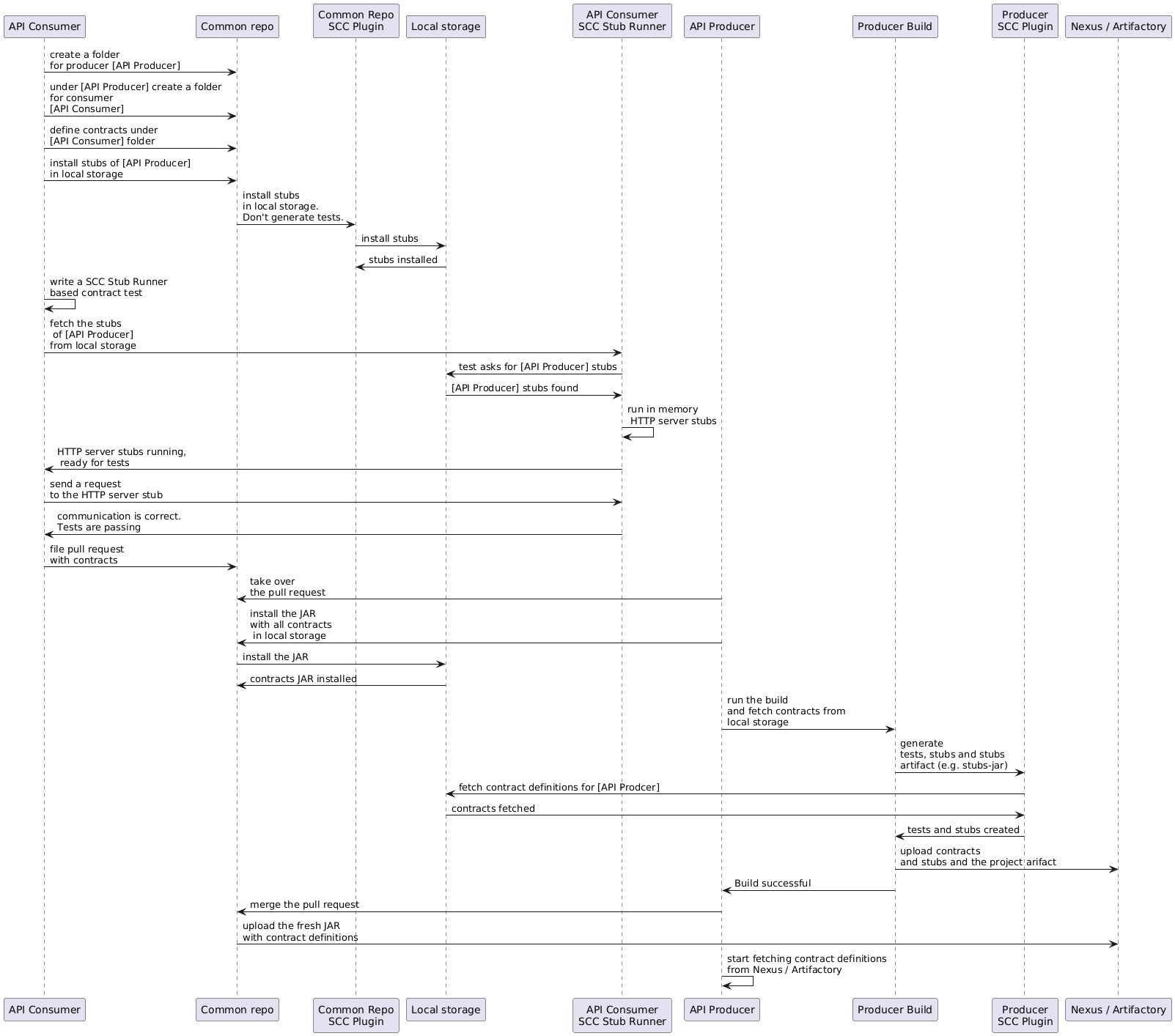
Consumer
当消费者希望离线处理合同时,无需克隆生产者代码,消费者团队只需克隆公共仓库,进入所需生产者的文件夹(例如 com/example/server),然后运行 mvn clean install -DskipTests 命令,即可在本地安装从合同转换而来的存根。
您需要在本地安装 Maven。
生产者
作为生产者,你可以修改Spring Cloud Contract Verifier,以提供包含合约的JAR的URL和依赖项,如下所示:
<plugin>
	<groupId>org.springframework.cloud</groupId>
	<artifactId>spring-cloud-contract-maven-plugin</artifactId>
	<configuration>
		<contractsMode>REMOTE</contractsMode>
		<contractsRepositoryUrl>
			https://link/to/your/nexus/or/artifactory/or/sth
		</contractsRepositoryUrl>
		<contractDependency>
			<groupId>com.example.standalone</groupId>
			<artifactId>contracts</artifactId>
		</contractDependency>
	</configuration>
</plugin>
通过此配置,系统会从 [link/to/your/nexus/or/artifactory/or/sth](https://link/to/your/nexus/or/artifactory/or/sth) 下载 groupid 为 com.example.standalone、artifactid 为 contracts 的 JAR 文件。随后,该 JAR 文件会在本地临时文件夹中解压,并选取 com/example/server 目录下的契约文件用于生成测试和存根。基于这一约定,当发生不兼容的变更时,生产者团队能够明确知道哪些消费者团队会受到影响。
其余的流程看起来是一样的。
如何按主题而非生产者定义消息契约?
为了避免在公共仓库中出现消息契约重复,当多个生产者向同一主题写入消息时,我们可以创建一种结构,其中REST契约按生产者放置在文件夹中,而消息契约则按主题放置在文件夹中。
对于 Maven 项目
为了能够在生产者端工作,我们应该指定一个包含模式,用于根据我们感兴趣的消息主题来过滤公共仓库的jar文件。Maven Spring Cloud Contract插件的includedFiles属性允许我们这样做。此外,需要指定contractsPath,因为默认路径将是公共仓库的groupid/artifactid。以下示例展示了用于Spring Cloud Contract的Maven插件:
<plugin>
   <groupId>org.springframework.cloud</groupId>
   <artifactId>spring-cloud-contract-maven-plugin</artifactId>
   <version>${spring-cloud-contract.version}</version>
   <configuration>
      <contractsMode>REMOTE</contractsMode>
      <contractsRepositoryUrl>https://link/to/your/nexus/or/artifactory/or/sth</contractsRepositoryUrl>
      <contractDependency>
         <groupId>com.example</groupId>
         <artifactId>common-repo-with-contracts</artifactId>
         <version>+</version>
      </contractDependency>
      <contractsPath>/</contractsPath>
      <baseClassMappings>
         <baseClassMapping>
            <contractPackageRegex>.*messaging.*</contractPackageRegex>
            <baseClassFQN>com.example.services.MessagingBase</baseClassFQN>
         </baseClassMapping>
         <baseClassMapping>
            <contractPackageRegex>.*rest.*</contractPackageRegex>
            <baseClassFQN>com.example.services.TestBase</baseClassFQN>
         </baseClassMapping>
      </baseClassMappings>
      <includedFiles>
         <includedFile>**/${project.artifactId}/**</includedFile>
         <includedFile>**/${first-topic}/**</includedFile>
         <includedFile>**/${second-topic}/**</includedFile>
      </includedFiles>
   </configuration>
</plugin>
前面 Maven 插件中的许多值都可以更改。我们包含它是为了说明目的,而不是试图提供一个“典型”的示例。
对于 Gradle 项目
要使用 Gradle 项目:
-
为公共仓库依赖添加自定义配置,如下所示:
ext {
    contractsGroupId = "com.example"
    contractsArtifactId = "common-repo"
    contractsVersion = "1.2.3"
}

configurations {
    contracts {
        transitive = false
    }
} -
将公共仓库依赖添加到类路径中,如下所示:
dependencies {
    contracts "${contractsGroupId}:${contractsArtifactId}:${contractsVersion}"
    testCompile "${contractsGroupId}:${contractsArtifactId}:${contractsVersion}"
} -
将依赖下载到合适的文件夹中,如下所示:
task getContracts(type: Copy) {
    from configurations.contracts
    into new File(project.buildDir, "downloadedContracts")
} -
解压 JAR 文件,如下所示:
task unzipContracts(type: Copy) {
    def zipFile = new File(project.buildDir, "downloadedContracts/${contractsArtifactId}-${contractsVersion}.jar")
    def outputDir = file("${buildDir}/unpackedContracts")

    from zipTree(zipFile)
    into outputDir
} -
清理未使用的合约,如下所示:
task deleteUnwantedContracts(type: Delete) {
    delete fileTree(dir: "${buildDir}/unpackedContracts",
        include: "**/*",
        excludes: [
            "**/${project.name}/**"",
            "**/${first-topic}/**",
            "**/${second-topic}/**"])
} -
创建任务依赖关系,如下所示:
unzipContracts.dependsOn("getContracts")
deleteUnwantedContracts.dependsOn("unzipContracts")
build.dependsOn("deleteUnwantedContracts") -
通过设置
contractsDslDir属性来配置插件,指定包含合约的目录,如下所示:contracts {
contractsDslDir = new File("${buildDir}/unpackedContracts")
}