使用 REST Docs
你可以使用 Spring REST Docs 来为基于 Spring MockMvc 或 WebTestClient 的 HTTP API 生成文档(例如,采用 Asciidoc 格式)。在为 API 生成文档的同时,你还可以通过使用 Spring Cloud Contract WireMock 来生成 WireMock 桩。为此,编写常规的 REST Docs 测试用例,并使用 @AutoConfigureRestDocs 来自动在 REST Docs 输出目录中生成桩。下面的 UML 图展示了 REST Docs 的流程:
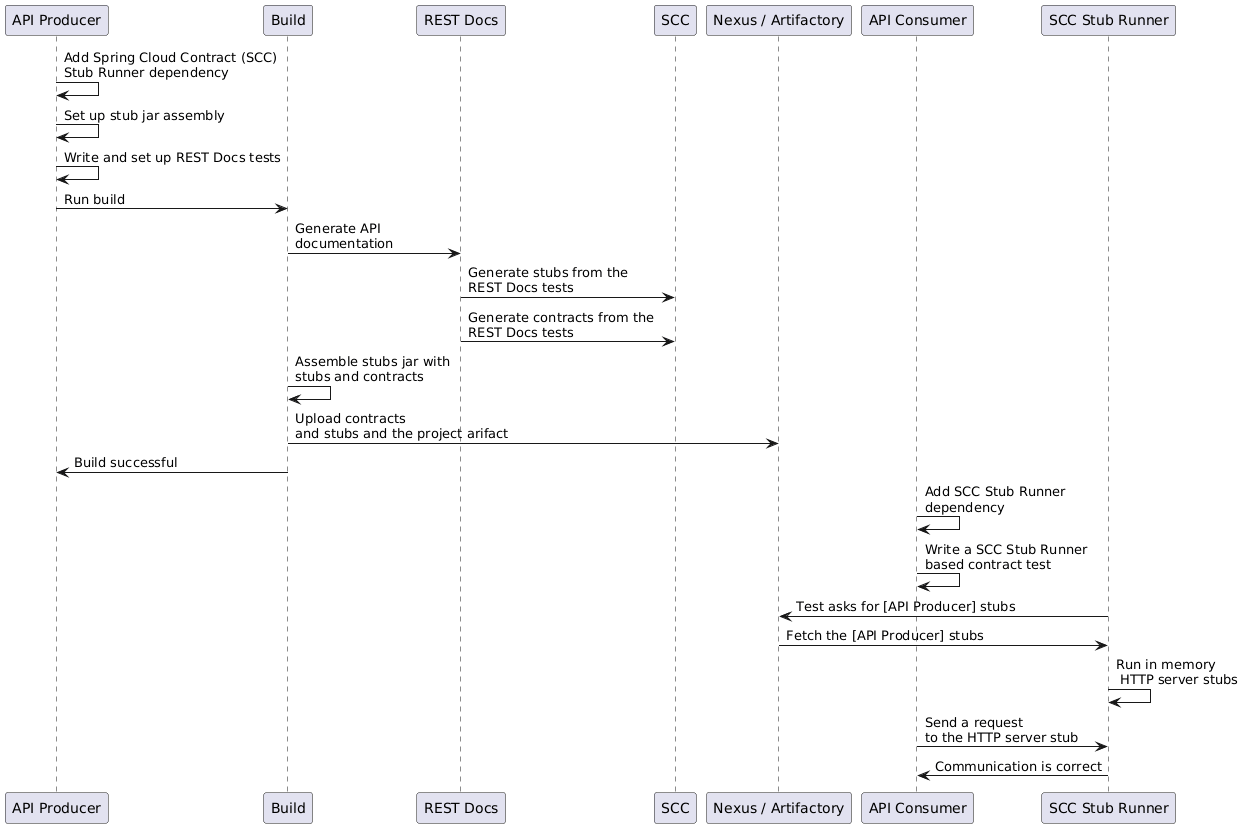
以下示例使用了 MockMvc:
@RunWith(SpringRunner.class)
@SpringBootTest
@AutoConfigureRestDocs(outputDir = "target/snippets")
@AutoConfigureMockMvc
public class ApplicationTests {

	@Autowired
	private MockMvc mockMvc;

	@Test
	public void contextLoads() throws Exception {
		mockMvc.perform(get("/resource"))
				.andExpect(content().string("Hello World"))
				.andDo(document("resource"));
	}
}
该测试在 target/snippets/stubs/resource.json 处生成一个 WireMock 桩。它匹配所有发送到 /resource 路径的 GET 请求。使用 WebTestClient(用于测试 Spring WebFlux 应用程序)的相同示例如下:
@RunWith(SpringRunner.class)
@SpringBootTest
@AutoConfigureRestDocs(outputDir = "target/snippets")
@AutoConfigureWebTestClient
public class ApplicationTests {

	@Autowired
	private WebTestClient client;

	@Test
	public void contextLoads() throws Exception {
		client.get().uri("/resource").exchange()
				.expectBody(String.class).isEqualTo("Hello World")
 				.consumeWith(document("resource"));
	}
}
无需额外配置,这些测试会创建一个存根,其中包含针对 HTTP 方法和除 host 和 content-length 之外的所有请求头的匹配器。为了更精确地匹配请求(例如,匹配 POST 或 PUT 请求的请求体),我们需要显式创建一个请求匹配器。这样做有两个作用:
-
创建仅按您指定的方式匹配的存根。
-
断言测试用例中的请求也满足相同的匹配条件。
该功能的主要入口点是 WireMockRestDocs.verify(),它可以作为 document() 便捷方法的替代品,如下例所示:
import static org.springframework.cloud.contract.wiremock.restdocs.WireMockRestDocs.verify;

@RunWith(SpringRunner.class)
@SpringBootTest
@AutoConfigureRestDocs(outputDir = "target/snippets")
@AutoConfigureMockMvc
public class ApplicationTests {

	@Autowired
	private MockMvc mockMvc;

	@Test
	public void contextLoads() throws Exception {
		mockMvc.perform(post("/resource")
                .content("{\"id\":\"123456\",\"message\":\"Hello World\"}"))
				.andExpect(status().isOk())
				.andDo(verify().jsonPath("$.id"))
				.andDo(document("resource"));
	}
}
前面的合约规定,任何带有 id 字段的有效 POST 请求都会收到此测试中定义的响应。你可以链式调用 .jsonPath() 来添加额外的匹配器。如果你对 JSON Path 不熟悉,JayWay 文档可以帮助你快速上手。此测试的 WebTestClient 版本有一个类似的 verify() 静态辅助方法,你可以在相同的位置插入它。
除了使用 jsonPath 和 contentType 便捷方法外,你也可以使用 WireMock API 来验证请求是否与创建的存根匹配,如下例所示:
@Test
public void contextLoads() throws Exception {
	mockMvc.perform(post("/resource")
               .content("{\"id\":\"123456\",\"message\":\"Hello World\"}"))
			.andExpect(status().isOk())
			.andDo(verify()
					.wiremock(WireMock.post(urlPathEquals("/resource"))
					.withRequestBody(matchingJsonPath("$.id"))
					.andDo(document("post-resource"))));
}
WireMock API 功能丰富。您可以通过正则表达式以及 JSON 路径来匹配请求头、查询参数和请求体。您可以使用这些功能创建具有更广泛参数的存根。前面的示例生成的存根类似于以下示例:
{
  "request" : {
    "url" : "/resource",
    "method" : "POST",
    "bodyPatterns" : [ {
      "matchesJsonPath" : "$.id"
    }]
  },
  "response" : {
    "status" : 200,
    "body" : "Hello World",
    "headers" : {
      "X-Application-Context" : "application:-1",
      "Content-Type" : "text/plain"
    }
  }
}
你可以使用 wiremock() 方法或 jsonPath() 和 contentType() 方法来创建请求匹配器,但不能同时使用这两种方法。
在消费者端,您可以将本节前面生成的 resource.json 文件置于类路径中(例如,通过将存根发布为 JAR)。之后,您可以通过多种不同的方式创建使用 WireMock 的存根,包括使用 @AutoConfigureWireMock(stubs="classpath:resource.json"),如本文档前面所述。
在 Spring Cloud Contract 5.0.x 中,由于 Rest Assured 与 Groovy 5 不兼容,移除了对 Spring Rest Docs 中 Rest Assured 的支持。
使用 REST Docs 生成合约
您也可以使用 Spring REST Docs 生成 Spring Cloud Contract DSL 文件和文档。如果将其与 Spring Cloud WireMock 结合使用,您将同时获得契约和存根。
为什么你会想要使用这个功能呢?社区中的一些人提出了一个问题:他们希望迁移到基于DSL的契约定义,但已经拥有大量的Spring MVC测试。使用这个功能可以让你生成契约文件,之后你可以修改这些文件并将它们移动到配置中定义的文件夹中,这样插件就能找到它们了。
你可能会好奇为什么这个功能会放在 WireMock 模块中。这是因为同时生成契约和存根是有意义的。
考虑以下测试:
this.mockMvc
			.perform(post("/foo").accept(MediaType.APPLICATION_PDF)
				.accept(MediaType.APPLICATION_JSON)
				.contentType(MediaType.APPLICATION_JSON)
				.content("{\"foo\": 23, \"bar\" : \"baz\" }"))
			.andExpect(status().isOk())
			.andExpect(content().string("bar"))
			// first WireMock
			.andDo(WireMockRestDocs.verify()
				.jsonPath("$[?(@.foo >= 20)]")
				.jsonPath("$[?(@.bar in ['baz','bazz','bazzz'])]")
				.contentType(MediaType.valueOf("application/json")))
			// then Contract DSL documentation
			.andDo(document("index", SpringCloudContractRestDocs.dslContract(Maps.of("priority", 1))));
前面的测试创建了上一节中展示的存根,生成了合约和文档文件。
该合约名为 index.groovy,可能类似于以下示例:
import org.springframework.cloud.contract.spec.Contract

Contract.make {
    request {
        method 'POST'
        url '/foo'
        body('''
            {"foo": 23 }
        ''')
        headers {
            header('''Accept''', '''application/json''')
            header('''Content-Type''', '''application/json''')
        }
    }
    response {
        status OK()
        body('''
        bar
        ''')
        headers {
            header('''Content-Type''', '''application/json;charset=UTF-8''')
            header('''Content-Length''', '''3''')
        }
        bodyMatchers {
            jsonPath('$[?(@.foo >= 20)]', byType())
        }
    }
}
生成的文档(本例中格式化为Asciidoc)包含一份格式化的合约。该文件的位置将是 index/dsl-contract.adoc。
指定优先级属性
方法 SpringCloudContractRestDocs.dslContract() 接受一个可选的 Map 参数,允许您在模板中指定额外的属性。
其中一个属性是 priority 字段,你可以按如下方式指定:
SpringCloudContractRestDocs.dslContract(Map.of("priority", 1))
覆盖 DSL 契约模板
默认情况下,合约的输出基于名为 default-dsl-contract-only.snippet 的文件。
你可以通过重写 getTemplate() 方法来提供自定义模板文件,如下所示:
new ContractDslSnippet(){
    @Override
    protected String getTemplate() {
        return "custom-dsl-contract";
    }
}));
所以上面的例子展示了这一行
.andDo(document("index", SpringCloudContractRestDocs.dslContract()));
应更改为:
.andDo(document("index", new ContractDslSnippet(){
                            @Override
                            protected String getTemplate() {
                                return "custom-dsl-template";
                            }
                        }));
模板的解析是通过在类路径中查找资源来完成的。按顺序检查以下位置:
-
org/springframework/restdocs/templates/${templateFormatId}/${name}.snippet -
org/springframework/restdocs/templates/${name}.snippet -
org/springframework/restdocs/templates/${templateFormatId}/default-${name}.snippet
因此,在上面的示例中,你应该将一个名为 custom-dsl-template.snippet 的文件放置在 src/test/resources/org/springframework/restdocs/templates/custom-dsl-template.snippet 目录下。